Manage course objectives
Overview
Objectives (sometimes called standards) describe the skills and knowledge students are expected to demonstrate. Assignments, ratings, and grade calculations in TeachFront reference this objective list.
Before you start
- You must be on the teaching team for the course.
- Objectives work together with Proficiency Scales (see Proficiency scales overview).
Open objectives settings
- Open your course.
- Go to Course Settings.
- Select Objectives in the sidebar.
Create an objective
- On the Objectives page, select Create new objective.
- Complete the fields in the Create Objective window (names, descriptions, and links to proficiency scales as shown in the UI).
- Save.
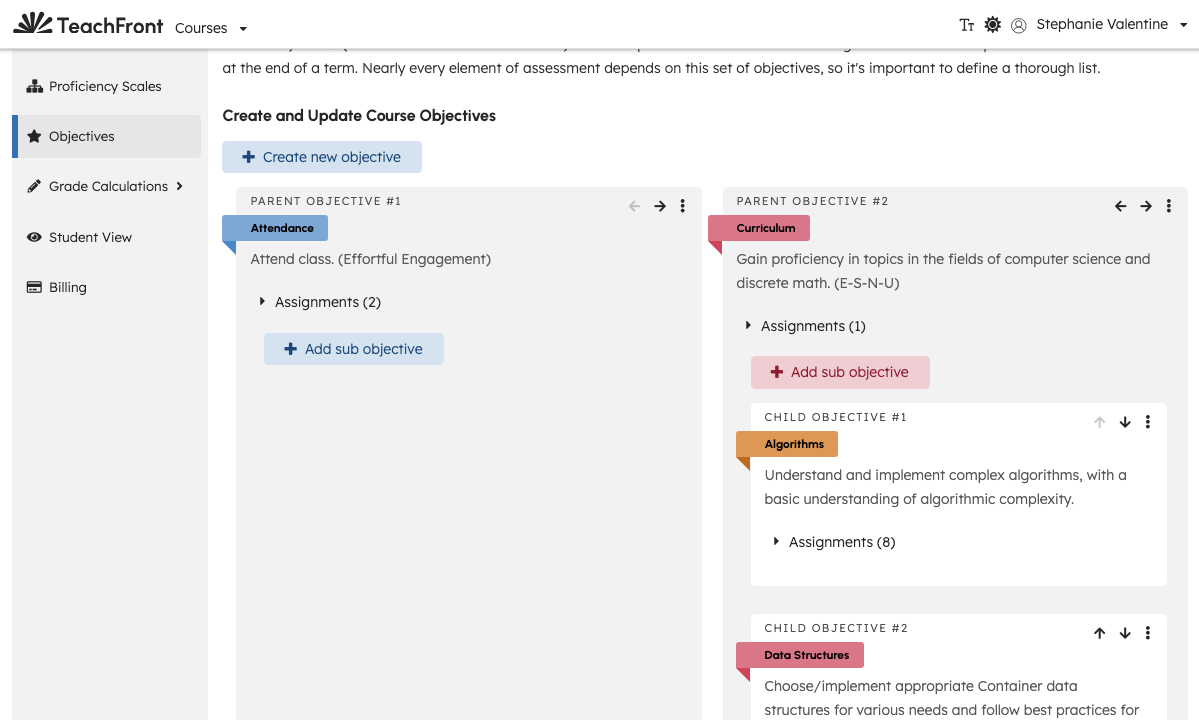
New objectives appear in the hierarchical list on the settings page.
Organize objectives
The settings page lists objectives in a hierarchy (parent objectives and nested items). Teaching-team members can:
- Edit an objective from its card actions.
- Reorder objectives using swap controls when available (for example move left/right between siblings).
Assignment linkage may be shown on objective cards when objectives are tied to assignments.
Related settings
Troubleshooting
| Situation | What to try |
|---|---|
| Cannot create objective | Confirm teaching-team access; complete required fields in the modal. |
| Grade Calculations pages prompt for objectives | Add objectives (and scales) before configuring benchmarks or thresholds. |
| Swap/reorder fails | Retry; check toast errors for API failures. |