View your grade calculations
Overview
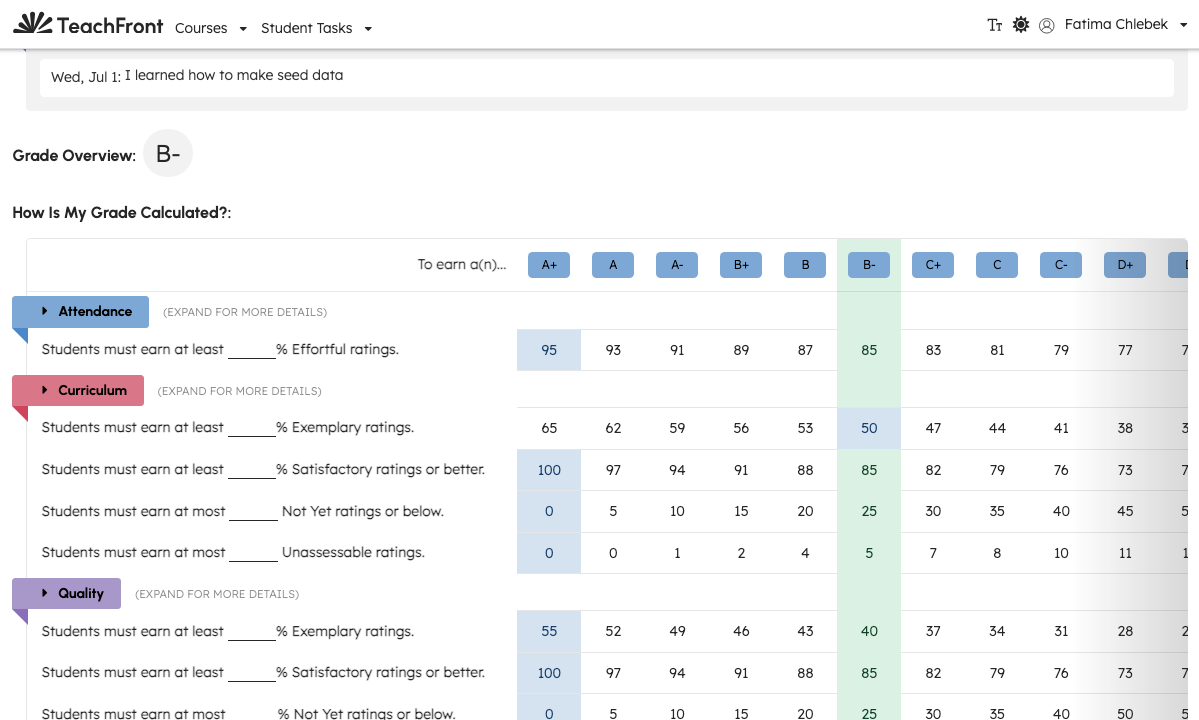
The Grade Calculations tab shows how your ratings and benchmark progress relate to grade distinctions in the course—when your instructor has configured grade calculations and made them visible.
Open grade calculations
- Open the course.
- Select Grade Calculations from the course menu (when available).
The page header is Course Grade Calculations.
What you may see
The view is a table or summary of your progress toward each grade distinction, based on benchmark groups and ratings your instructor includes in calculations. Exact columns depend on course setup.
You may also see a similar embedded table on the Syllabus page if your instructor included the grade-calculation marker in syllabus content.
Related
Troubleshooting
| Situation | What to try |
|---|---|
| Tab not visible | Your course may not expose grade calculations to students yet. |
| Empty or incomplete table | Ratings may still be in progress; ask your instructor. |
| Differs from syllabus embed | Both pull live data; refresh after new ratings are published. |