Read course announcements
Overview
Your instructor and teaching team post announcements in each course. Open the Announcements tab to read updates and—when allowed—reply in the thread.
Before you start
- You must be enrolled in the course and signed in to TeachFront.
Read announcements
- Open the course from your Dashboard.
- Select Announcements.
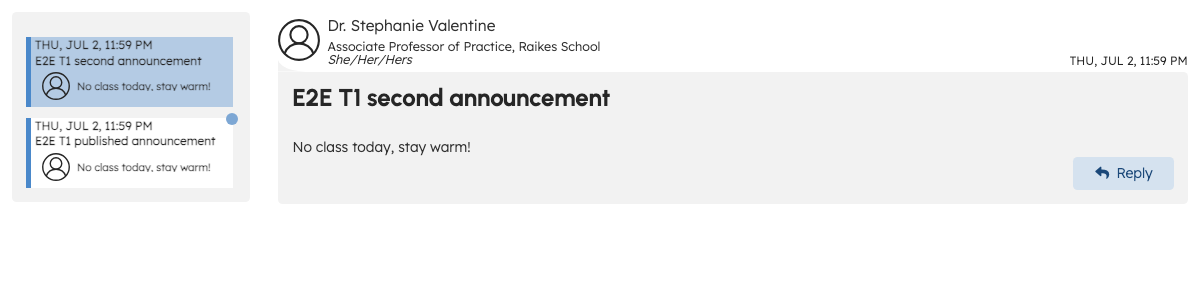
- Choose an announcement in the sidebar list to read it in the main panel.
Announcements are sorted with the newest at the top. When you first open Announcements, TeachFront selects the newest post if you have not chosen one yet.
You may receive email when your instructor first posts a new announcement. If an instructor edits a posted announcement later, you may not receive another email today — notification policy for edits is under review (DEC-078).
Unread indicators
- A colored dot on a sidebar tab means you have not read that announcement, or there are visible replies in that thread you have not opened yet.
- Opening a posted announcement marks it as read for you. Opening an announcement also marks any unread visible replies in that thread as read.
- Hidden replies and drafts do not affect your unread indicator.
Announcement links
If your instructor shares a direct link to an announcement:
- A valid link opens that announcement.
- If the announcement was removed or is not available to you, TeachFront opens the newest announcement you can access instead.
- A broken or malformed link shows the Not Found page.
Replies
If your instructor enabled replies for an announcement:
- You can add a reply under the announcement using the reply controls shown.
- You may see replies from other students and from the teaching team.
If replies are disabled, you can read the announcement but cannot post student replies.
Attachments
Some announcements include uploaded files. Download or open them using the file list shown with the announcement, if present.
Troubleshooting
| Situation | What to try |
|---|---|
| No announcements listed | Your instructor may not have posted yet; check back later. |
| Cannot reply | Replies may be disabled for that announcement. |
| Announcement looks incomplete | Refresh the page; confirm you opened the correct course. |
Related
- Student help intro
- Instructors: Course announcements