Achieving a "Weighted Average" Effect
In traditional grading, it is not uncommon for grades to be calculated using weighted averages. Weighted average grade calculation dictates that each type of assessment in the course contributes some amount of the final percentage. For example, a course syllabus might stipulate that:
- the points earned/points possible for exams are worth 40% of the grade,
- the points earned/points possible for homework are worth 50% of the grade, and
- the points earned/points possible for class participation are worth 10% of the grade.
So, a student's weighted average in traditional grading is calculated by:
studentGrade = studentExamPercent*.40 + studentHomeworkPercent*.50 + studentParticipationPercent*.10
Instructors are drawn to this type of calculation because it allows them to give relative importance to certain assessments over others. This idea of relative weighting is attractive to instructors who use proficiency-based grading as well, so, let's talk about how to achieve a similar effect with our "portfolio requirements" method of grade calculation.
As we discussed in the previous section, proficiency-based grading does not calculate grades via points earned/points possible percentages. Instead, it ensures that students build a strong foundation across all requirements of a course. Instructors who utilize proficiency-based grading often want to provide relative weights to different types of objectives. For example, you might want to give more relative weight to the objectives in the “Course Topics” category than to the “Effortful Engagement” category.
Note that we're weighting objectives, not assessment types. If we commit to the tenet of proficiency-based grading that we're looking to assess proficiency at the end of the term, rather than perfection at any point in time, we don't need to distinguish what kind of assessment opportunity evidenced the proficiency. Evidence is evidence, regardless of how you requested it be provided.1
Intentionally Organize Your Objectives
In order to weight some objectives more than others, we need to revisit the organization of your objectives. You saw in our example that we organized our objectives into three categories: Course Topics, Quality, and Effortful Engagement. Your list of categories may be different, but we caution you against having more than four. The more categories you choose, the more confusing grade calculations will be for your students. Also note that all objectives within a category need to be assessed using the same proficiency scale.
Once you're happy with the organization of your objectives, you can start thinking about the relative weights of each category. In the simplest terms, to give more weight to a category, you set more rigorous thresholds for that category than for the other categories. There is more nuance to explore, though, so let's dive in a bit deeper into the rationale behind the thresholds provided in our example grade calculation table:
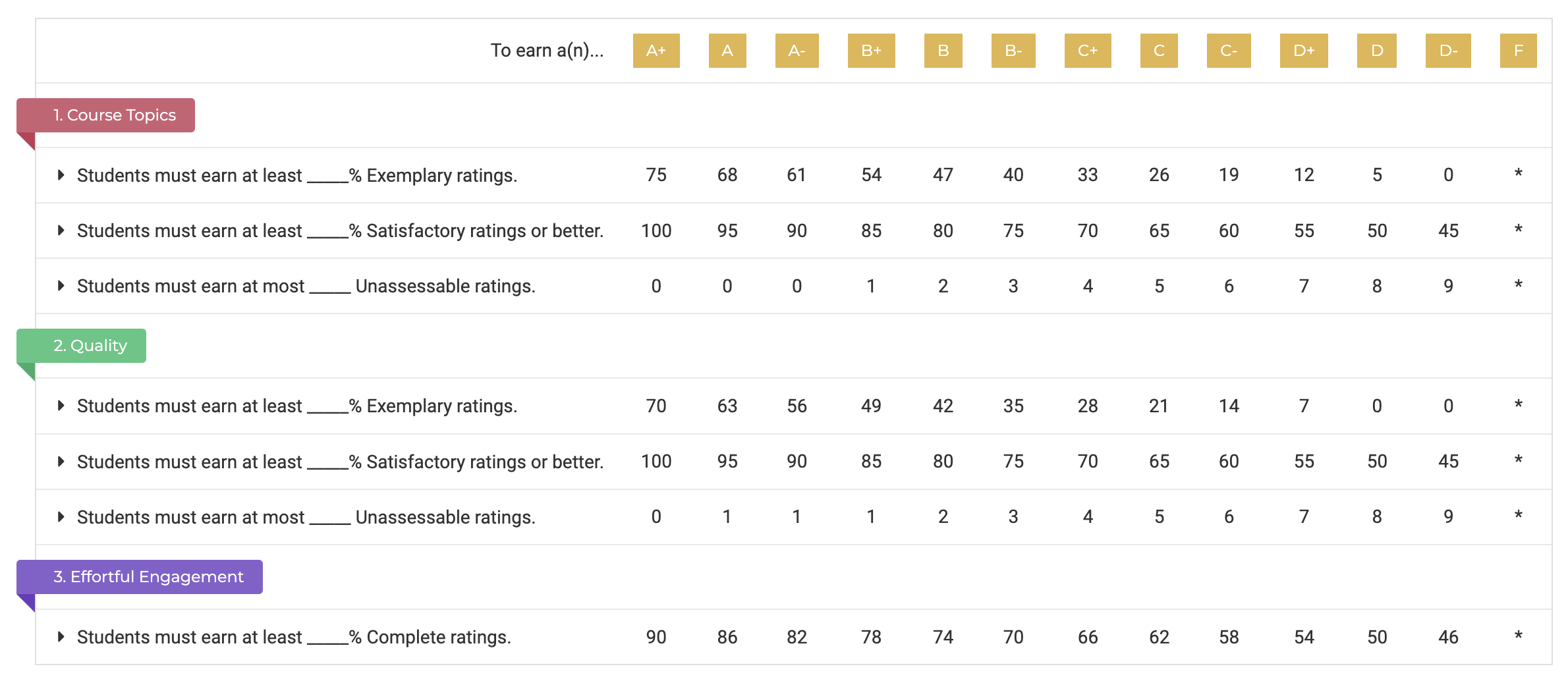
In this particular course, you can see evidence of "weighting" between all three categories. We'll focus on the Course Topics and Quality categories first. If you look closely at those two categories in the table you can see:
- Both categories of objectives are assessed with the same four-level proficiency scheme (Exemplary, Satisfactory, Not Yet, Unassessable).
- Both categories of objectives have the same thresholds for Satisfactory and Unassessable marks for each grade distinction. We reasoned that it is important for students to produce evidence of baseline proficiency (Satisfactory marks) for both Course Topics and Quality. Thus, for baseline proficiency, the categories have the same "weight."
- For high-level proficiency, however, the categories have different weights. Students need to produce more evidence of Exemplary work for Course Topics objectives than they need to produce for Quality objectives. This means that students need to provide more evidence of high-level proficiency (Exemplary marks) for the Course Topics category than for the Quality category for the same grade distinction. For example, in this course, to earn an A+, at least 75% of a student's marks in Course Topics must be Exemplary, but only 70% of their marks in Quality.
Now consider the Effortful Engagement category. The thresholds in this category have been calibrated over several terms to be fairly lenient given the general behavior patterns of the students in this particular course/school/university (your mileage may vary). The Effortful Engagement thresholds are high enough that students strive meet the expectations but are lax enough that they are very rarely the determining factor in a student's grade distinction.
Setting Your Own Thresholds
So, now it's time to write thresholds for your own course. This can feel daunting at first, so let's focus on one bit at a time.
Step 1: Choose One Grade Calculation Requirement
Choose one requirement at random and ignore all the other requirements. For sake of example, we'll choose the threshold for Satisfactory or higher marks in the Quality objective.
Step 2: Choose Two Grade Distinctions
Choose two grade distinctions that seem definitive to you. Usually, we choose A and C. We have a fairly good sense of what A-level work looks like, and our educational unit stipulates that a C is the last "passing" grade distinction.
Like in Step 1, after choosing your two grade distinctions, ignore all the others.
Step 3: Add Two Thresholds
Now, for each grade distinction, try to think of an appropriate threshold. You'll come up with something like:

Step 4: Find the Difference
Find the difference between your two thresholds. In our example the difference is 95-70 = 25.
Step 5: Count the Grade Distinctions in the Middle
Count the number of grade distinctions between the two that you've picked. In our example, there are 4 grade distinctions between A and C (A-, B+, B-, C+).
Step 6: Find the Step Amount
The step amount is the change in threshold values from one grade distinction to the next. This can be calculated like:
stepAmount = differenceBetweenThresholdValues/(gradeDistinctionsBetween + 1)
In our example, we have
stepAmount = 25 / (4+1) = 5
It's best if the step amount is an integer, so play with your values until you find a step amount (or amounts) that work for you.
Step 7: Fill In the Blanks
Use the step value to fill in each cell between your two definitive grade distinctions.
thresholdForCell = thresholdForPreviousCell + stepAmount
You'll end up with something like this:

Then, use the step amount to fill in all other cells, too. Once you're finished, you'll have all the thresholds filled in.

Step 8: Tweak the Thresholds
The purpose of the previous steps was to make a preliminary threshold gradient for your one objective. You may want to tweak that. Perhaps you want full grade distinctions (A,B,C, etc.) to have larger step values than the incremental grades (A+, A-, B+, etc.) Perhaps you want the step value to steadily decrease toward the top of the gradient. Play around with the thresholds and see what feels right to you.
If you're not sure what "feels right," err on the side of strict. You can always modify the thresholds throughout the term, so long as they are modified to be less strict.
Step 9: Repeat
Now that you have all the thresholds set for one requirement, you have a basis from which to build all your other requirements. Here, you can explore the nuance of "weighting" as you generate the complete table of thresholds for your course.
Consider the number of opportunities you will give students to earn marks in each category. We have learned from experience that percent-based categories with relatively few marks (fewer than about 15) should probably have more lax thresholds than your instincts might lead you to believe. In a category with few marks, a few marks at the lower levels can reduce a percentage substantially without having much of an impact on proficiency.
Help! The Term is Underway and My Calculations Are Too Strict!
Usually, when grade calculations are considered too strict, there's really only one or two requirements causing the issue. So, look at each too-strict requirement and tweak it until it better suits your expectations for your students.
The most straightforward way to handle too-strict thresholds is simply to shift each threshold over one grade distinction (so the previous threshold for an A becomes the threshold for an A+, the previous threshold for an A- becomes the threshold for an A, etc.).
Alternatively, you can subtract some constant from every threshold. For example, if your thresholds progressed 80, 75, 70, 65, etc., you could subtract a constant of 3 from every threshold, leaving you with 77, 72, 67, 62, etc.
Looking Forward
Phew! You've finished the administrative part of designing your proficiency-based grading course! The next section will give you some general guidance about how to explain proficiency-based grading on your syllabi, but after that, we move on to the fun things, like designing assignments and watching our students grow. Let's go!